
Showing posts with label Magazine advertisement. Show all posts
Showing posts with label Magazine advertisement. Show all posts
Wednesday, 4 May 2011

Tuesday, 26 April 2011
Editing music advertisement
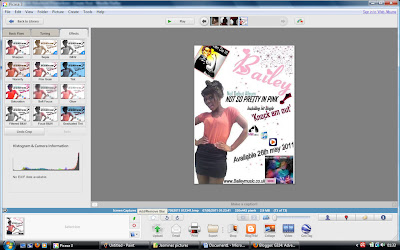
I just found out today that I couldn't use any original images from google if they were not edited and I realised that my final magazine advertisement had an un-edited image from google of the WW1 propaganda - you can do it poster. Therefore I changed it and edited the image on Picasa as photo editing software. I used a focal lack and white as this would be eye catching to the audience as it brings out the colour in the woman's facial expression on the poster. Now I have edited the image of the poster my final draft of my advertisement is now finished.

Thursday, 7 April 2011
Music advertisement - Idea 1 - The process
So I've decided to go with Idea 1!
I'm going to go through with you the making process which involved me making this. I'm going to go with a pink and white colour scheme as I want the audience to strait recognize the pop advertisement. I will use the same font as my digipack in pink so the audience can make a connection. Furthermore will add a picture of the WW1 propaganda this way the audience can get a feel for bailey; that she is a strong independent artists, she can also be related to successful artists such as Pink who is also known for her strong independent character.
Step 1:
So firstly as I wanted a tall picture of Oyinda so I went on the social networking site face book and found a really nice picture which was perfect for my advertisement. As I wanted the background to be white I had to cut this out on the photo editing software Paint. I did this with the picture zoomed in at 400% and used the eraser button. (see picture below)

Step 2:
Step 2 involved adding this picture in word. I copied and pasted this into word then added the extra bits. Firstly I added the artists name at the top right hand corner. I used the editing website to get the same font as my Digipack as this would create a connection between my two ancillary tasks. I then print screened this on paint again and added pink stars using the shape box. I thought this would give a feminine edge and reach out to younger audiences as well as older. Further more I added the WW1 propaganda to the top left hand corner of the word document which would create a connection with the music video and portray her as a strong independent character. Finally for this step I also added a small image of my digipack photo, this is for the audience to recognize the album so when they see it in a store they are likely to pick it up.
Step 3:
So this step is the final step which involves adding the writing. I'm going to add a website to promote her further so the audience can log onto it and find out the latest news and promotions. 'www.bailey.com' I will also add a release date and where to buy the album from. By adding this information the audience will be waiting for it with anticipation and are given clear instructions where to buy it from which makes it simple for the audience as they don't have to bother looking around. I added the writing from blingee.com. I thought that by using different fonts and colours this would make it more eye catching and dynamic for the audience.
Final version:
Wednesday, 30 March 2011
Thursday, 17 March 2011
Subscribe to:
Posts (Atom)